Managing accounts receivable shouldn’t eat up your team’s time - or your margins. Yet for many businesses, invoicing, chasing payments, reconciling transactions, and dealing with high processing fees still take hours every week.
Benji Payments changes that.
Benji Pays is a fully automated accounts receivable and payment processing platform built to save time, reduce fees, and improve cash flow—without disrupting the accounting tools you already rely on.
Seamless Accounting Integrations
Benji Payments integrates directly with your accounting system keeping invoices, payments, and receipts perfectly synced. No duplicate data, no manual reconciliation, and no accounting headaches.
Lower Fees, More Control
Benji offers lower processing costs. Businesses can accept credit cards or $1 ACH/EFT payments, with optional surcharging to help offset fees and protect margins.
Less Admin Work
By automating invoice reminders, payments, and reconciliation, Benji Payments reduces administrative workload by up to 90%, freeing teams to focus on higher-value work instead of chasing payments.
Full AR Automation
Benji Payments handles the entire accounts receivable process - from auto-charging invoices and batch payments to sending branded reminders automatically - so nothing falls through the cracks.
How to Apply?
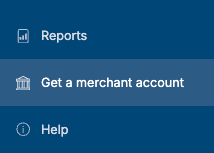
In order to apply, you will need to sign in to Benji Pays, and you will find the "Get a merchant account" option on the left side menu.
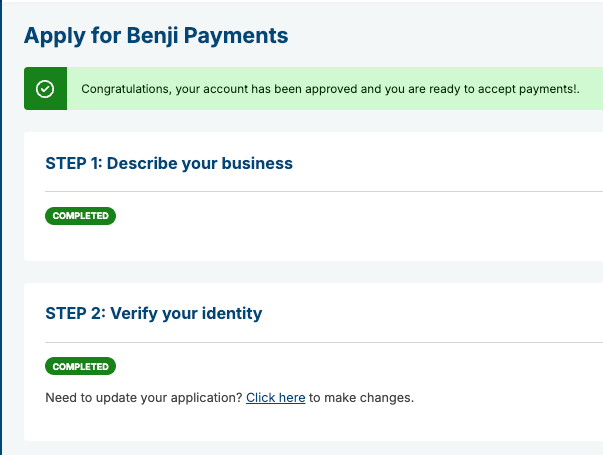
Please complete the business description and verify your identity. Our team will also provide you with a secure link to submit your financial documentation. The order in which these steps are completed (submitting documents, verifying identity, and submitting documents via the secure link) is flexible.
Was this article helpful?
That’s Great!
Thank you for your feedback
Sorry! We couldn't be helpful
Thank you for your feedback
Feedback sent
We appreciate your effort and will try to fix the article