On this page
Invoice Lookup Recovery helps customers continue to payment when a public Pay Now link does not uniquely match an invoice. Customers verify the invoice using the invoice number, invoice date, and original invoice total, then continue to a secure guest checkout page.
IMPORTANT Customers must enter all three invoice details correctly. The invoice number must identify a single payable invoice.
What Invoice Lookup Recovery does
You can:
- Automatically redirect customers to the recovery page when a supported Pay Now lookup fails.
- Share the recovery page URL directly with customers.
Before you begin
- Confirm that your public Pay Now link looks up invoices by invoice number.
- Prepare optional instructions that explain where customers can find their invoice details.
- Confirm the portal domain you will use if you plan to share the recovery page directly.
Turn on automatic redirect
- Open Settings in Benji Pays.
- Click Customer Portal settings.
- Scroll down to Portal and Pay Now link settings.
- Under Recommended for additional security, enable Invoice Lookup.
- Optionally add custom instructions that will appear on the recovery page.
- Save your changes.
Enable Invoice Lookup Recovery under Portal and Pay Now link settings.
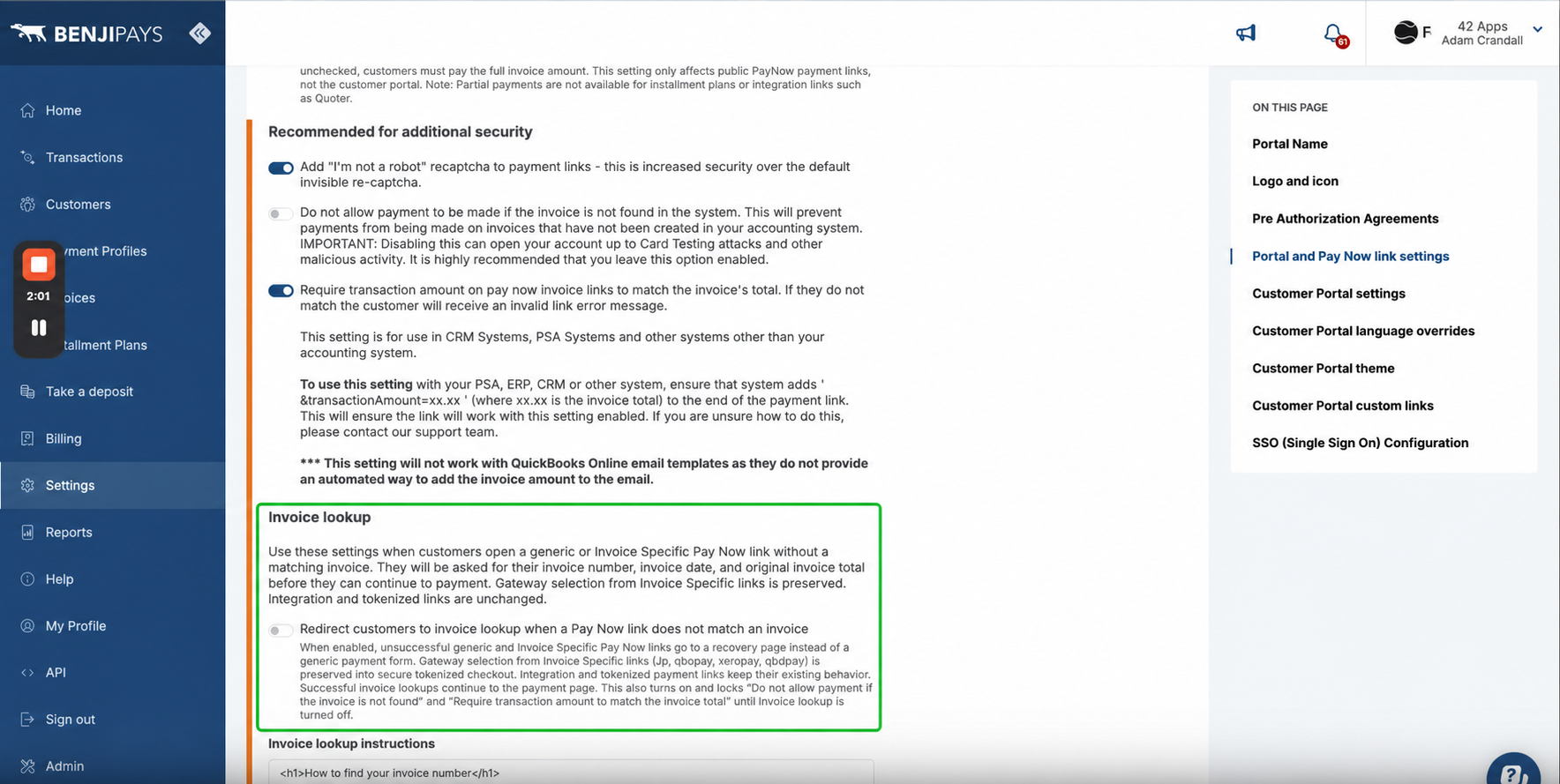
NOTE When Invoice Lookup Recovery is enabled, Benji Pays also turns on Do not allow payment if the invoice is not found and Require transaction amount to match the invoice total. These companion settings remain locked until Invoice Lookup Recovery is turned off.
What the customer enters
On the recovery page, the customer enters:
- Invoice number
- Invoice date, as shown on the invoice
- Original invoice total, not the remaining balance
Customers verify the invoice number, invoice date, and original invoice total.
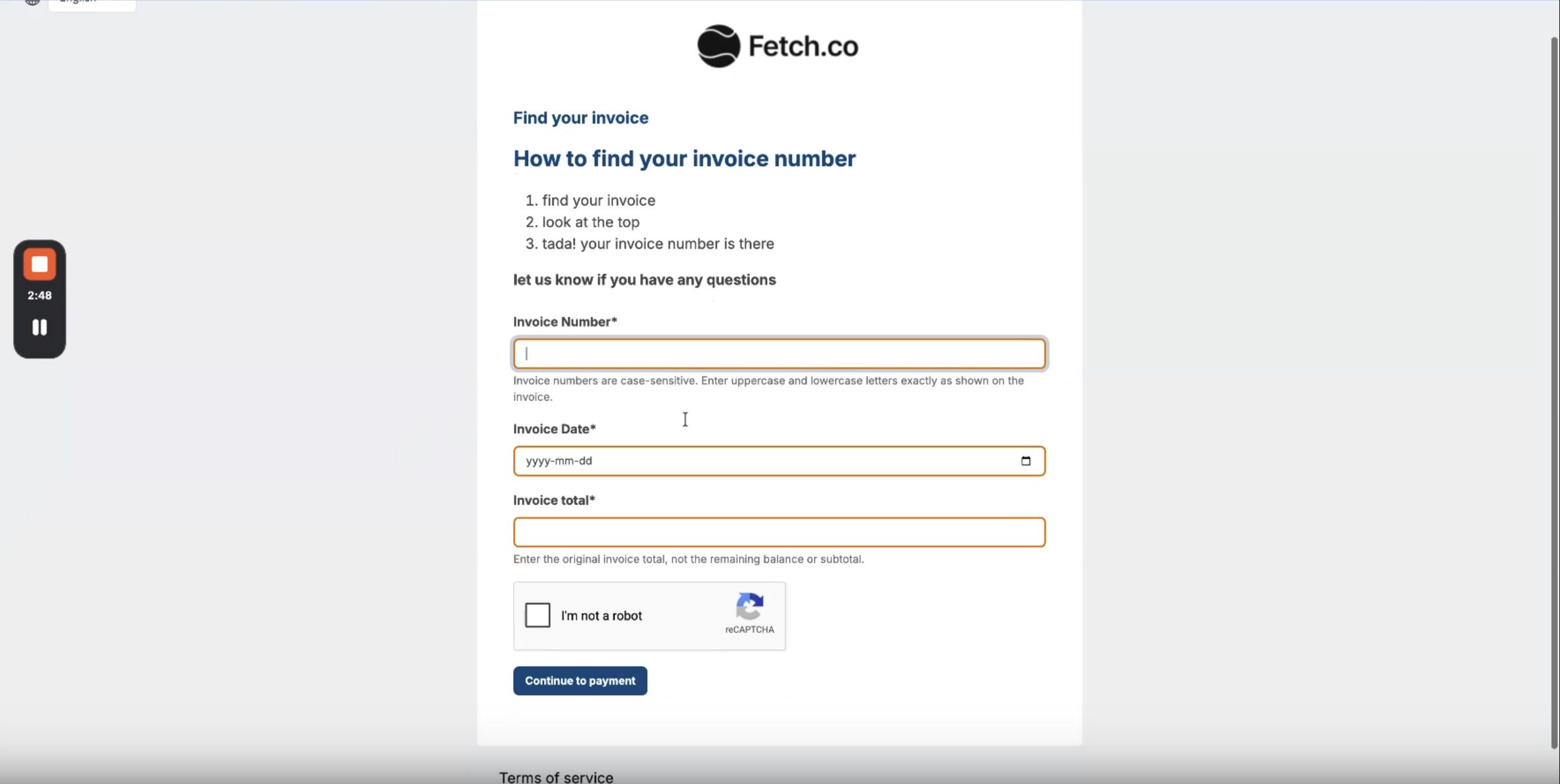
The details must match a single payable invoice. If more than one invoice has the same number, or the date or total does not match, the customer sees a generic verification error and no payment page opens.
FORMAT Customers can enter amounts using common formats, including 125.50, 1,234.50, or 125,50.
Confirm the customer workflow
- Open a supported Pay Now link that does not match an invoice.
- Confirm that the customer is redirected to the invoice lookup page.
- Enter the invoice number, invoice date, and original invoice total.
- Select Continue to payment.
- Confirm that a secure guest checkout page opens for the verified invoice.
SUCCESS The recovered payment is tied to the verified invoice and posts to that invoice automatically.
Share the recovery page directly
Every merchant portal has a recovery page at:
https://<your-portal-domain>/portal/invoice-lookup
If your portal name appears in the path instead of the hostname, use:
https://pay.example.com/portal/<your-portal-name>/invoice-lookup
You can share this URL even when automatic redirect is turned off. Useful places to share it include:
- Invoice emails or payment reminder templates
- Your website's Pay an invoice page
- Support replies when a customer's original Pay Now link does not work
Optional query parameters
| Parameter | Purpose |
|---|---|
| currency | Limits the lookup to a currency, such as USD or CAD. |
| gatewayId | Preserves the payment gateway from an Invoice Specific link after verification. |
NOTE The invoice number is never prefilled. Customers always enter it themselves.
Which payment links are affected
Automatic redirect applies to generic Pay Now links and Invoice Specific links that look up an invoice by number.
- Generic links: /pay and /pay/{currency}. After verification, Benji Pays selects the gateway using the usual portal defaults for the invoice currency and customer.
- Invoice Specific links: gateway hash (/p), QuickBooks Online (/qbopay), Xero (/xeropay), and QuickBooks Desktop (/qbdpay). The gateway from the original link is preserved into secure tokenized checkout.
Tokenized links, API-created applied links, and other integration-specific payment links are not redirected to Invoice Lookup Recovery. The recovery page can still be shared directly with any customer.
Guest checkout and security
A successful lookup creates a short-lived guest checkout link:
- Saved payment methods are not shown.
- The customer pays with a new card or payment method.
- The checkout link expires after about one hour.
Additional protections include:
- CAPTCHA when portal CAPTCHA is enabled for your account
- Rate limiting to reduce automated guessing
- Generic error messages that do not reveal whether an invoice exists
- Server-side validation of preserved gateways
Custom instructions
You can add optional HTML instructions to the recovery page, such as where to find the original total on your invoice PDF. Allowed formatting is limited to headings, paragraphs, bold or italic text, and lists. Scripts, links, and images are removed. If you leave the instructions blank, customers see the default Benji Pays guidance.
Troubleshooting
| Problem | What to try |
|---|---|
| Verification failed | Confirm the invoice number, invoice date, and original total—not the balance due. Remove extra spaces and try again. |
| Multiple invoices have the same number | Contact the merchant. Recovery works only when the number identifies one invoice. |
| Invoice is already paid or has no balance | Paid invoices cannot be opened for payment through recovery. |
| Checkout link expired | Start again from the recovery page. Successful lookups create a short-lived checkout link. |
| Saved payment method is missing | Recovery checkout is guest-only by design. Use the customer portal login when a saved payment method is required. |
SUPPORT TIP If a customer cannot verify an invoice, ask them to send the invoice header showing the invoice number, date, and original total so you can confirm the values they should enter.
Was this article helpful?
That’s Great!
Thank you for your feedback
Sorry! We couldn't be helpful
Thank you for your feedback
Feedback sent
We appreciate your effort and will try to fix the article