It is an email authentication method designed to detect forged sender addresses in email (email spoofing), a technique often used in phishing and email spam.
To have your receipts sent from your company email address, we require that you verify that you own your domain name by configuring DKIM.
In Benji Pays go to "Settings> Company Settings" and scroll to the bottom of the page to view the instructions for setting up DKIM.
Set Up Email Authentication for Your Domain
Why This Matters
These settings help ensure emails sent by Benji Pays using your Custom From Email Address are trusted and less likely to be rejected or marked as spam.
For more information on why DKIM, SPF and DMARC are important, please see this article on AWS.
What You Need To Do
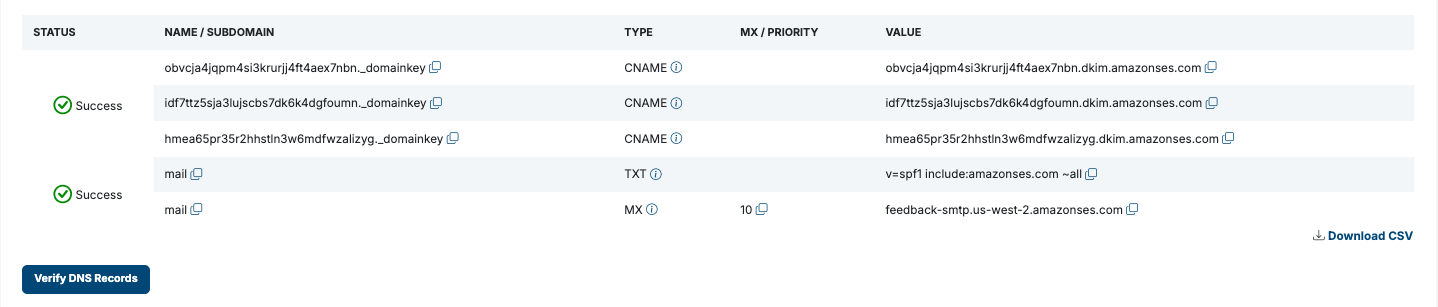
- Generate, then copy or download the DNS records listed below
You will need to click the "Generate DNS Records" button for them to appear.
- Have your website administrator add them to your domain's DNS settings
- Wait up to 72 hours for changes to propagate
Once You Have Added the DNS Records
- Click the Verify DNS Records button.
- It may take up to 72 hours for records to propagate and be verified.
- These records must remain in place permanently to ensure emails continue to deliver reliably.
Explanation of Each Record:
1. CNAME Records (DKIM)
- What is their purpose?
- These are DKIM records. When BenjiPays sends emails on your behalf, each message is cryptographically signed. The DKIM records publish a public key that lets the recipient's email system verify the signature, confirming the message came from you and wasn't altered in transit.
- What does DKIM stand for?
- DKIM stands for DomainKeys Identified Mail. It's an email authentication standard that uses cryptographic signatures to help verify the sender and protect messages from tampering.
- Why are there 3 of them?
- To enhance security, DKIM keys are periodically rotated. Having three CNAME records allows for a seamless transition between keys without disruption in email delivery.
2. TXT Record (SPF)
- What is its purpose?
- The SPF record authorizes Amazon SES, the service BenjiPays uses, to send emails on your domain's behalf. It tells email providers that these emails are legitimate, helping prevent spoofing and improving deliverability.
- What does SPF stand for?
- SPF stands for Sender Policy Framework. It is an email security protocol used to specify which servers are allowed to send emails for a domain.
- Why does it refer to 'billingbp'?
- Emails are sent using a subdomain called 'billingbp' as the “MAIL FROM” domain. This is a technical sender address that handles things like bounces and complaints. It works behind the scenes and plays a key role in authentication.
- Will recipients be confused by this?
- No, your recipients will still see your main domain in the “From” and “Reply-To” fields, just like in any normal email. The 'billingbp' subdomain is only used behind the scenes and isn't visible to them.
3. MX Record
- What is its purpose?
- This MX (Mail Exchange) record allows Amazon SES to handle email feedback, such as bounce and complaint notifications, for the 'billingbp' subdomain.
- Why is feedback handling important?
- When an email can't be delivered or is marked as spam, Amazon SES uses this subdomain to receive that feedback. This helps maintain your domain's email reputation and ensures better deliverability over time.
- Will this affect my regular email setup?
- No, this MX record applies only to the 'billingbp' subdomain, which is used exclusively for system-level email handling. It does not impact your regular email accounts, inboxes, or how you send and receive everyday emails.
Was this article helpful?
That’s Great!
Thank you for your feedback
Sorry! We couldn't be helpful
Thank you for your feedback
Feedback sent
We appreciate your effort and will try to fix the article