If an ACH/EFT payment is later declined/returned, QuickBooks Online may reverse/void the payment but HaloPSA might still display the invoice as Paid if it isn’t receiving the right payment update events from QBO.
This article explains the most common cause and how to confirm your HaloPSA webhook settings are configured correctly.
Why this happens
ACH/EFT payments can appear successful at first and only be declined/returned after processing. When that happens:
QuickBooks Online updates the payment status (voided/deleted/reversed depending on how it’s recorded)
HaloPSA should receive that update via QBO Webhooks
If Halo is not subscribed to the “voided/deleted” payment event, the invoice may remain marked as Paid in Halo
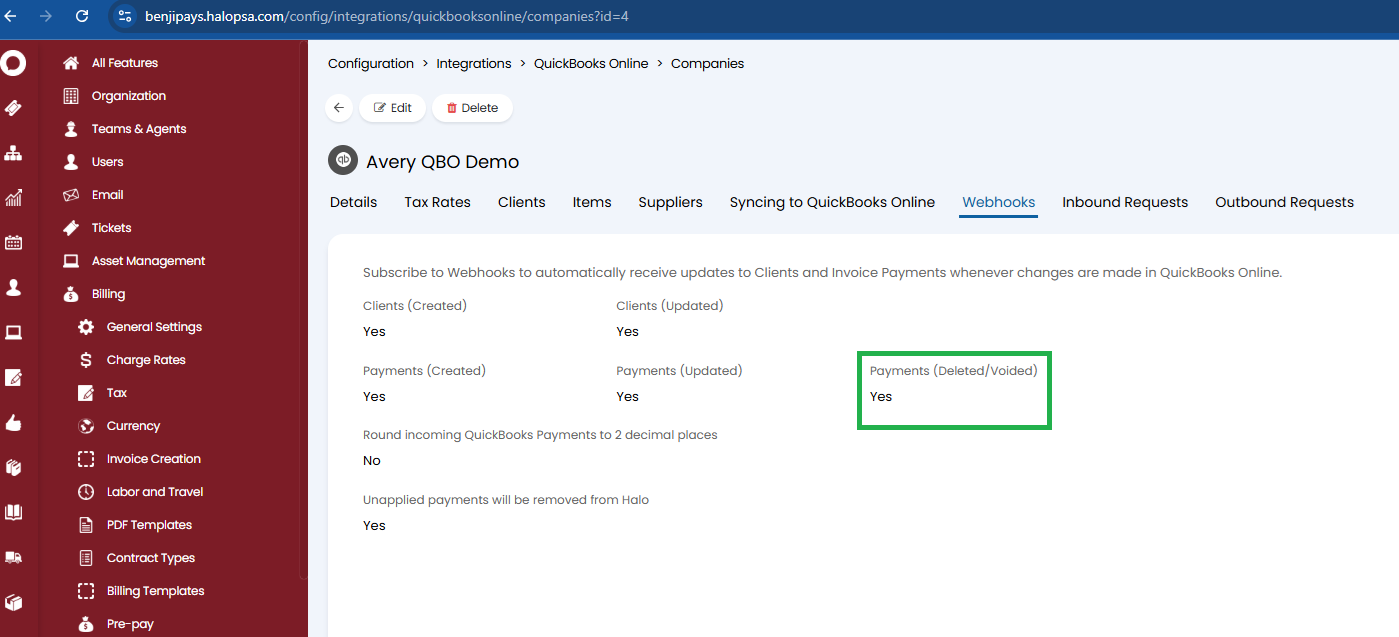
Fix: Confirm the “Payments (Deleted/Voided)” webhook is enabled in HaloPSA
In HaloPSA, go to:
Configuration → Integrations → QuickBooks Online → Companies → (select your company) → Webhooks
Make sure the following are set to Yes:
Payments (Created)
Payments (Updated)
✅ Payments (Deleted/Voided) (this is the key setting)
If Payments (Deleted/Voided) is not enabled, Halo may not receive the reversal event, and the invoice will remain “Paid” even after the ACH/EFT fails.
Was this article helpful?
That’s Great!
Thank you for your feedback
Sorry! We couldn't be helpful
Thank you for your feedback
Feedback sent
We appreciate your effort and will try to fix the article