Email: https://www.elavon.com/contact-us.html
Phone Number: 1-800-377-3962
To view all Elavon/Converge Errors: Click here!
Error retrieving session token. Please try again. If this error persists, please contact your vendor.. Click Continue to try again.
This issue is almost always caused by the required IP address not being listed in your Converge account’s allowed connections.
Please refer to the Connecting to Elavon article, locate the list of IP addresses, and contact Converge Support to have them add these IPs to your Converge account.
If you get an Authentication error (ELAVON 4025 Authentication Error)
This indicates that the gateway settings in Benji Pays are incorrect:
Settings > Payment Gateway Settings > Press "pencil" icon to edit the configuration.
- SSL Merchant ID / Account ID
- SSL User
- SSL PIN
Please go through the steps in the Connecting to Elavon support article again to ensure all information is entered correctly.
Error loading the payment modal, but not a session token error
In most cases, this issue is caused by incorrect referrer URLs and/or the “Use HTTP Referrers” setting not being unchecked in your Converge account.
Follow step A2 in the support article to obtain the correct URLs, and then contact Converge Support to:
1. Add all three URLs to your account:
• www.benjipays.com
• app.benjipays.com
• yourportalnamehere.benjipays.com or custom domain
2. Ensure the “Use HTTP Referrers” setting is unchecked.
This terminal or user ID is not permitted to process this transaction type.
Must be completed by Converge Support only.
Set up an API user, commonly called “apiuser”, with the following permissions:
Administrator - level User Rights
Converge Site says: Velocity Check
Ensure the following rules have "Enable Terminal Setting" unchecked and that they are not enabled:
• Transaction Timeout
• Daily Velocity
• Hourly Velocity
• Hourly Velocity by IP Address
error - Initialize payment modal failed, status code=403
This error usually indicates a temporary system issue. Please try again later. If the problem continues, contact Elavon Support for assistance.
Error: Error retrieving session token: Please check the card info and re-submit.
The error you're encountering typically occurs when one or more of the required setup steps (A1 to A7) have not been completed. When these steps are missing, the field for entering credit card information will not populate as expected.
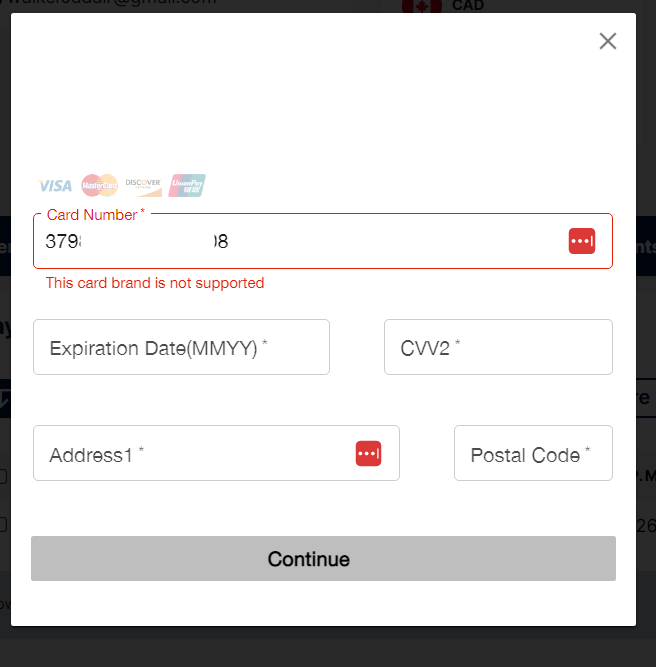
Card brand is not supported
This indicates that American Express is not enabled on your Elavon Converge account. To resolve this, contact Elavon support and they can assist you in enabling American Express on your Elavon account.
Transaction not allowed
You'll need to contact your Payment Gateway provider to set up a vault in your account. Once done, you can enable the feature to save payment information on payment links.
Error message "Card brand is not supported" with Elavon
When adding a payment profile, processing a payment or when your customer is paying their invoice on your payment links, you may see the below message.
This indicates that American Express is not enabled on your Elavon Converge account. To resolve this contact Elavon support and they can assist you in enabling American Express on your Elavon account.
Was this article helpful?
That’s Great!
Thank you for your feedback
Sorry! We couldn't be helpful
Thank you for your feedback
Feedback sent
We appreciate your effort and will try to fix the article