Summary
Benji Pays can create a company-specific, custom PDF invoice rendered from a template we host. Because invoices are created in QuickBooks Desktop and Benji Pays reads and renders that invoice data, custom invoice PDFs require engineering, testing, and safe deployment. Customization work starts at $500 and may be higher depending on complexity.
What we do
- Create or modify a custom HTML invoice template stored in the Benji Pays platform and render it into a PDF for emails and downloads.
- Render invoice PDFs from the invoice data Benji Pays syncs from QuickBooks Desktop. We do not edit invoices inside QuickBooks Desktop.
- Ensure the PDF correctly displays invoice totals, taxes, line items, grouped lines, custom fields, and any other data required for accounting accuracy.
Why customization costs start at $500
Custom invoice PDFs are engineering work, not only design work. The base fee covers the essential tasks required to deliver a safe, reliable invoice PDF:
- Template development - Building or modifying an HTML template and wiring it to dynamic invoice data such as line items, grouped lines, taxes, discounts, and custom fields.
- HTML-to-PDF rendering and QA - Converting the HTML into a print-quality PDF and testing the template with many invoice shapes so layout does not break on edge cases. The PDF generator uses a browser renderer, so templates must be robust and tested.
- Accounting verification - Verifying the template does not hide, truncate, or misstate critical accounting fields or amounts. Benji Pays posts payments and syncs to QuickBooks, so accuracy is required.
- Deployment and configuration - Deploying and enabling company-specific templates in the Benji Pays system so future invoices use the new template.
- Support and follow-up - The fee includes one round of minor revisions after initial delivery. Significant additional changes will be scoped and quoted separately.
Typical process and timeline
- Request and discovery - Merchant submits a support ticket with examples and requirements. We confirm what is possible and identify complexity.
- Quote - We confirm the $500 starting fee and provide a firm quote if the request is more complex. Work does not begin until the merchant accepts the quote.
- Development - We build or modify the template in Benji Pays, wire up invoice fields, and render sample PDFs.
- Testing - We test with a set of real invoices and edge case invoices to validate layout and accounting fields.
- Deployment and enablement - We enable the template for the merchant's Benji Pays company so future PDFs use it.
- Sign-off and revisions - Merchant reviews final PDFs. One round of minor revisions is included. Larger changes or new requirements are scoped and quoted as additional work.
How to request a customization
Open a support ticket or email us at support@benjipays.com using the subject line:
Invoice PDF customization - QuickBooks Desktop
Attach the items listed in the checklist below. The support team will review and reply with a firm quote and next steps.
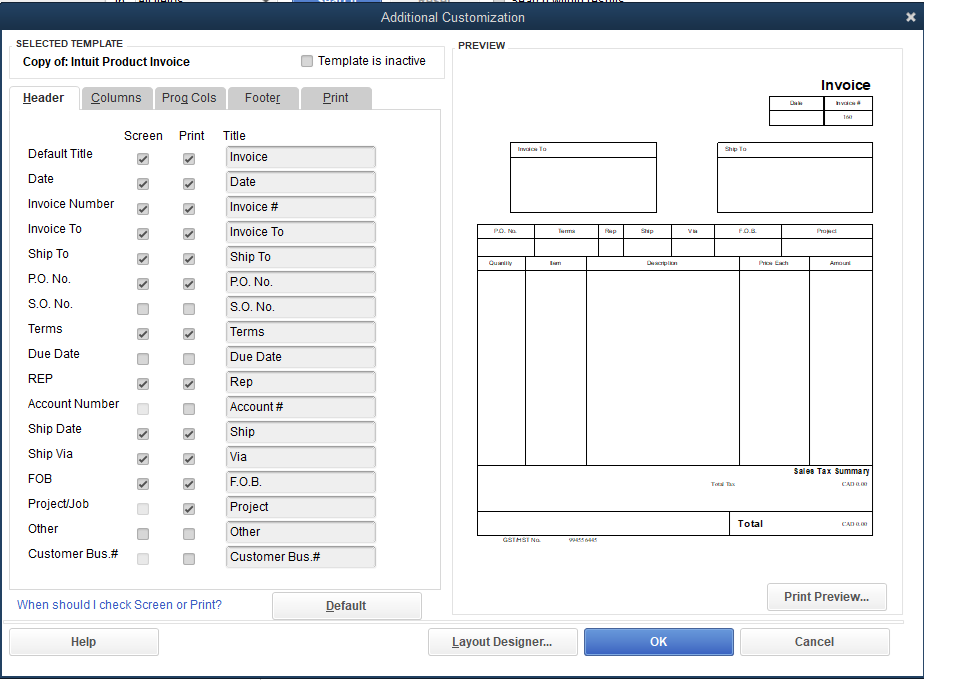
To find fields being used, navigate to Lists > Templates and open the Invoice Template you would like to pull fields from. Click the Additional Customization button and you should see a screen similar to the one below:
Merchant checklist
| Item | Details |
|---|---|
| Benji Pays company name | Your company name as it appears in Benji Pays |
| Billing contact and email | Name and email for the person who will receive the invoice for this work |
| QuickBooks Desktop version | e.g. QuickBooks Enterprise 2024 |
| Current invoice example | A PDF or screenshot of your current invoice as it looks today |
| Requested changes | A marked-up version of your invoice or a design file showing what you want changed |
| Sample invoices (3-5) | Real invoices covering edge cases: short, long, grouped line items, taxed, and discounted |
| Fee acknowledgement | Confirmation that you accept the $500 starting fee |